Best Photo Restoration Software To Restore Your Old Photos in 2024

Everyone has old photos with a lot of memories. But with time some of these photos may be blurred or their resolution may be not in the condition of today high quality screens. So in that case people want to upgrade their photo resolutions and take good-quality photos, then they can keep these photos forever. There are plenty of apps and software for this task. This article shows what is the best software to restore your old photos. These are the best in the field. 

Choosing the best photo restoration software always depends on some common factors. They are what you need from that software. Editors’ skill level is always another matter. If the editor is not a pro, try to get super-easy software to edit. When choosing software also consider the price. Because the majority of these software are paid for their services. In the 2024 year, here are some top options for this software.

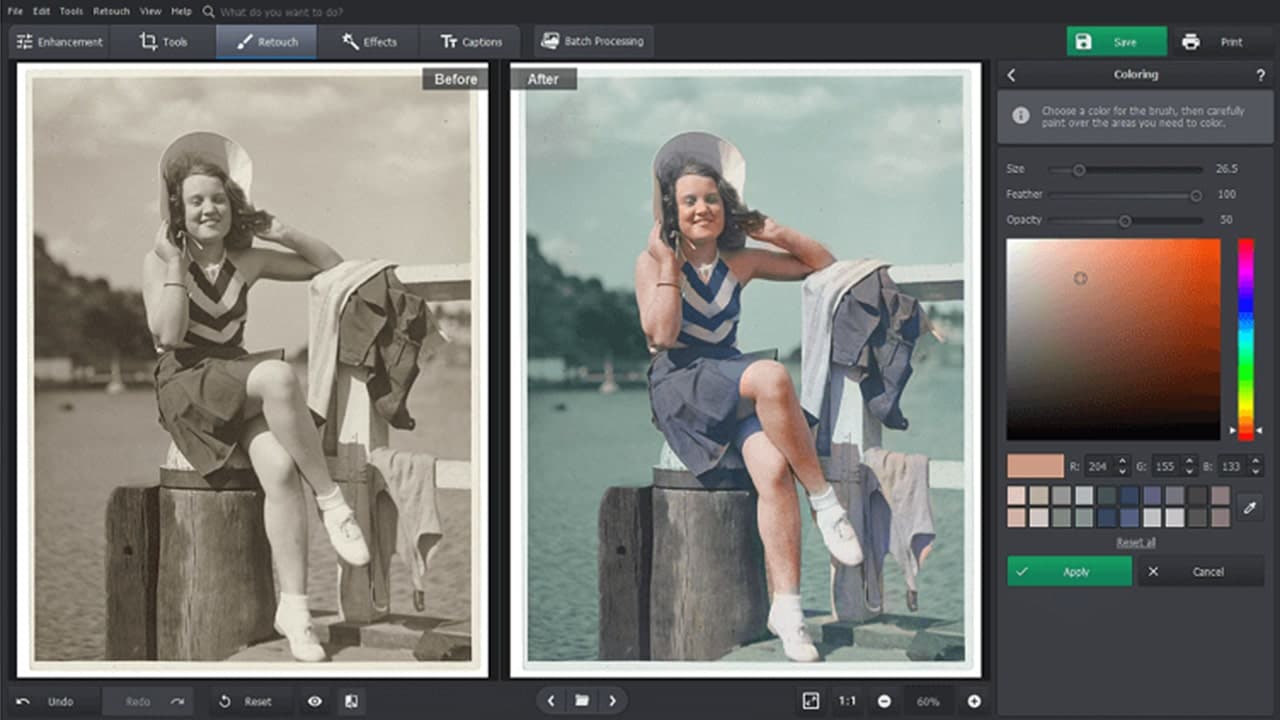
PhotoGlory PRO

photoglory pro

This is AI-powered software with plenty of restore options. It does not matter if you are a beginner or a pro here you can easily work with this software. It has a user-friendly interface.

This can colorize your B&W pictures without any hassle. All you have to do is upload your photo into the software and click on the button “Colorize”. And also you can manually customize the colors as you wish. If your photo has any scratches, stains, or other flaws, this software again will be the best solution for it.

This software comes with cutting-edge tools and these will help to get rid of these nasty imprints. With the retouching tools, the editor can easily erase any unwanted thing. It helps to apply new colors to the faded colors of your photo. Captions and Date Stamps are other things you can add using the editor. Is the photo ripped? Don’t worry with this PhotoGlory anyone can easily assemble these photos and it turns negative pictures into positive ones. Can download the free version to your computer. It supports Windows 11, 10, 8, and 7 versions. Also, can order the standard version at a $27.50 price. The Deluxe version is $42.00 and the pro version is $56.00 only. This purchased version is for a lifetime and you can fix unlimited photos with this software.

Adobe Photoshop

adobe photoshop

This is the industry standard tool for photo editing. It also uses AI technology to restore the photos. And with Photoshop this process will be simpler. All have to do is, import the old photo into Photoshop. And create a new layer. With this new layer, editors can add all the edits and they don’t affect the original photo. They can add photo restoration filters by going to filters then Neural filters and photo restoration. With the spot-healing brush tool and clone stamp tool, Editors can fix damages in the photo. If the photo is black and white you can add color quickly and easily. After doing all these changes, can save the image as a JPG, TIFF, PNG, or other image file formats as you wish.

You can also restore faded color photos in Photoshop. This is a paid software. But they provide a free trial for the users. First editors can use this trial to get a proper idea about the software. After that, if they are satisfied, they can start the monthly plans. They start at US$22.99 per month. 

GIMP

gimp

GIMP is the best free photo restoration software. This is available for LINUX, macOS, Windows, and more operating systems. Anyone can download this software from their official website. The first thing have to do is launch the software first. Then upload the photo. Create a duplicate layer. With this, editors can always go back to your original photo. Use the heal tool for small scratches and other things. Also, can correct the color-faded photos with color balance, Hue-Saturation, and curves tools. With the colors tool, editors can access these tools. There are many other tools that anyone can use to restore the photos. So users can enjoy all these tools for free. After you are satisfied with the restored photo you can save their work. To save it click the file and export and choose the right format as users wish. Then choose the exact location and save the file. 

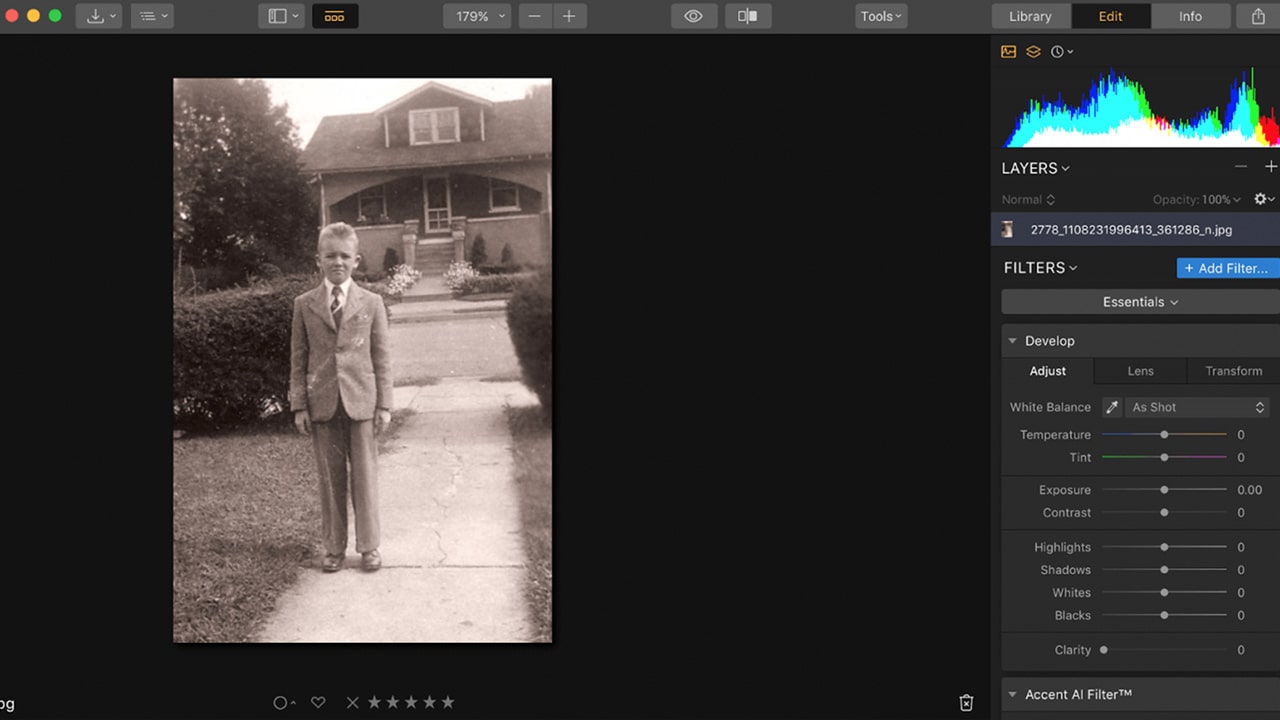
Luminar Neo

luminar neo

This is the best AI photo-restoring software. With this, editors can easily restore old photos. Anyone can improve the quality and colors of damaged photos easily. Adjust the color channels and get good colors once the photos have. Also, can convert color photos to black and white ones. They offer a wide range of tools to restore photos. Especially this has AI-powered tools and they make your work more simple. Enhanced AI is a tool like that. It analyzes your photos and applies required adjustments in a click. Also, it has Noiseless AI and Supersharp AI. They make the photo deliver noise-free and high-quality photos. This is a paid software and they provide a free trial to get a proper idea about the software.

Retouch Pilot

retouch pilot

This software is famous because of its simplicity. Editors can also use this software to connect to the Photoshop apps. Users can download the demo version for free. It is available for all Windows versions. However, there are limitations to the software’s free trial. Users can only save images in .tpi format. After they buy the original version they can download it as they wish. Editors can order the original software for 29.95 EUR. With this software, the retouched and restoring process will become much easier. Not only the restore tools, when someone buys this software they also get plenty of tools to retouch their photos. This can remove worn spots or any scratches in a picture. Basically, it retouched the photos and made them modern then it will appear as a new photo.

As said in the beginning whether someone is a pro in this field or not they can easily restore their old photos and make the memory life longer.

Difference Between Remini Web and Remini App

Nowadays, there are a lot of AI-powered photo editing apps. But Remini is one of the best among all these apps. Users can enhance photos with this and make quality photos. Also, there are a lot of creative tools like background editing effects, filters, etc. There are some attractive features like AI Enhancement, Image restoration, colorizer, and auto-enhance. There are two types of this app: free and premium. Also, two versions based on the app or web. People always want to know which is better, the Remini professional web or the Remini mobile app. Do these two versions give the same results, or can you use both the Remini professional web and the Remini mobile app for photo and video editing? These are the most common questions about this version. In this article, we are going to give details about these two and help to figure out what is best.

First of all, if someone needs clarification about choosing a version between these two, both are fantastic tools for photo and video editing. These two give effective photo editing and video editing tools. But they have their unique pros and cons.

Remini Professional Web

remini web

Photographers can get this version from Remini’s official website. The best thing is that they can get all the features on a big screen. If someone prefers to avoid using their phones for editing, then this is the best tool for them. With this Remini chrome help, you can easily enhance any photo to a stunning one. Remini offers an online free trial, and it is a great way to test the tool. With this, you can get an idea about the web version before paying for the premium version. The Remini web app and Remini for PC are user-friendly Chrome tools with great features.

Remini Mobile App

remini app

If someone does not have a powerful computer or has a low-end computer, this is the best way to edit their photos. The Remini Mobile app gives all the best features for photo editing. Also, this is a perfect tool for revising social media posts. Among all AI apps, the Remini app is the best one because of its colorizing feature. This version also has some effects that Remini Web does not have, like gradients and vignette effects. Most casual users use this version. 

Comparison

When we compare these two, Remini Web is mostly used by Professional photographers, and photographers and casual users use the app version. These two have batch-processing features, and the web version can do it with up to 10000 photos. However, the customization options are limited on the Mobile app when we compare it with the Web version. And the output resolution is the main difference between these two. Remini’s professional web output resolution is up to 8K, while the mobile app is limited to 1080p. But the mobile app is the best solution price-wise. It costs $5 per month, while the web version is $24.99 per month. 

Advantages of  Web

  • Users don’t need to transfer photos between PC and phone.
  • Can edit photos on a wide screen.
  • Zoom the image as the editors wish.
  • Easy to handle.

Advantages of the Remini Mobile App

  • You can download it easily from the Play Store and get updates from it. 
  • Can use the app anywhere.
  • Editors can also use the old version of the Remini app.
  • Secure and free to use. 

Between these two, we recommended the web version because it uses a big screen, and editing photos and videos is always easy on big screens. But using these versions always depends on your own choice. The best thing is that Remini offers a cloud-based service. Users can upload their projects to the cloud and access them through the mobile app.

How Long Do Photographers Take to Edit Photos?

Basically, the time to edit a photo depends on different things. Typically professionals in this field spend minutes or hours editing the photos. Sometimes they spend days until they get the quality they want. They always try to get a perfect finish. So there is not an exact time to edit a photo or photos. The time it takes to edit photos is a collection of different things. When we talk about this it starts from the very beginning. It means from taking the photos to final delivery.

edit photos

Editing Photos

Normally editing a landscape photo or product shot takes 10 minutes or more. Edit a portrait photo requires around 20 minutes. Retouch that kind of photo requires around one and a half hours. Sometimes they have to choose the best shot and delete the blur and unwanted ones. 

The first thing is the quality of the photographer. It is always true that the best photographers capture the best photos. The quality of the photographer depends on the experience level of the photographer. If that person is an experienced one, the photos will be of the best quality. When the photo is perfect the editing time will be more less than less-quality ones. 

After you take the photos you have to transfer the photos to the editor’s computer. This is another thing that affects the editing time. If you try to transfer the images by connecting the camera directly to the computer it will take more time than you think. So it is better to use a card reader. It speeds up the transfer progress. 

Another fact is that computer type. The quality of the software they use and the type of computer play a significant role in the editing process. If the computer type is not enough the editing process keeps lagging and increases the time. Also, some software‘s editing process makes the editing time longer than expected. So get good software and a good computer essential if you are willing to edit photos quickly.  

The type of photo is the main factor when we consider time. Time will be changed from photo type to type.

Portrait Photography

portrait photography

The first editor has to clear the environment. It means cleaning the photo. This includes removing the patches, cropping, and correcting the lens shots. If want they rotate the photo or mirror it. This will take some time. Because editors have to think and this is the basic step of the long process. 

Then have to edit the contrast. This may take some time if the editor doesn’t have an exact idea about color balancing. Sometimes they have to make photos darker or brighter. And also sharpening the colors and adjusting the shadows is a part of this. Editors take a long time to do this because everything depends on the colors in the photo. They try to get neat output from colors. 

The next process is working with filters and brushes. This includes the retouching process, which is essential in portrait photography. Because with a proper retouching process you can make a good-quality photo. After this, all the photos want to give a final touch. The editor Sharpe resized the photo to good quality. Then they print the photos or give the photo collection as a soft copy. 

Landscape Photography

landscape photography

This required more time than portrait photography. Editors have to save the real look and edit the photo. They have to adjust the brightness and contrast, this depends on the editor’s experience level. The next step is to do color balancing. Fix color patches and give a neat color output. 

This is a landscape photo. So the editor has to remove any background obstacles. It removes all distractions and makes the photo clear. Then fix the environment and add the atmosphere. It dong by adding glow effects. After all, do the final touch and deliver the photo. 

Wedding Photography

wedding photography

This is a huge process. Photographers have to capture the real moments. Then the editor has to edit the photo to save the real look of the moment. Simply wedding photography comes with a collection of photos. You have to choose what photo want to edit and what won’t. As long as this is a photo collection it simply follows the same theme. So editor has to think about it when they edit. 

Then increase the resolution and cropping unwanted things. After that retouched the photo and ensured the photo was clear. Then do the final touch and deliver the photo.

Fully Retouched Portrait

fully retouched portrait

This means these photos want a full skin retouched. These types of editing take more time

than basic portrait editing. The editing process is the same as the portrait one. But this needs full brightness and color adjustment. With this editor can highlight the required sides of the skin and protect colors.

Then do color grading. Then edit the face and fix the face. This is done before the skin is retouched. It is essential to do this for skin retouched. So it gives the best final output. This stage includes coloring the lips, and hair and adjusting the brightness of the hair and iris. 

Skin retouching is done after that. This includes removing unwanted wrinkles and dark patches. Also using brushes makes smooth skin and varying skin tones. Then do the final touch. Sharpe the photo and blur requested areas include in this stage. This sharpening probably does for the model’s eyes. Because in a portrait most critical part is the eyes of the character. 

The fact is the client’s requirements and suggestions. When an editor or photographer gives the edited photos to the customer, they review it. Sometimes they want to add some more things and maybe they are not happy about the edited one. So they may give some suggestions according to their wish. Then the editor has to do these revisions and hand over the photos. This process can happen again and again until the customer is happy about the output. This will take some time and this also adds to the required time.  

The time it takes to edit different factors and most basically the editor experience level and the photo type. So choosing the best editor is a must for your photos.

Best AI Video Enhancer Software To Improve Video Quality

If you are a video editor or some random person who tries to improve the video quality of your videos, some AI tools will help you to do this task very easily and effortlessly. With these AI tools and software, you can enhance your videos very easily. This article is about the best video improvement AI software that you can use to enhance the quality of the videos. All you have to do is download this software and upload your videos. Then the magic happens. Most of this software is free. So let’s dive into the topic.

 1. HitPaw Video Enhancer

hitpaw video enhancer

This is a free AI video enhancement software. You can download this software on Windows or MacOS very simply. This software automatically upgrades low-resolution or compressed video files to high-quality resolution videos. You can get 4K or 8K video quality very easily with this. This is not only for colored movies but also effective for black and white movies. There is also a paid version and it gives more features than the free version. This video upscaling tool will remove the noise of videos and make it more clear. And also you can easily retouch the face features and get a better look. This is one of the best video quality and resolution enhancers among all the video upscale software.

 2. Topaz Labs Video AI

topaz labs video ai

This is a paid video editing and improvement platform. With this video enhance software you can upgrade your video quality to 16K resolution quality which means this gives an ultra super quality video. This software is trained with millions of video frames to understand the video noise and other details. With this training, it can easily understand the different voices and cut down unwanted noises. With these frames, it can understand and recognize the faces and you can retouch them as you want. You can get these all features for around $300. But this is worth it.

3. AVCLabs Video Enhancer

avclabs video enhancer

This is another video upscale software that can be used to enhance your video quality. With this software, you can upgrade SD to HD, HD to 4K, and 4K to 8K. This is available for Windows and Mac devices. You can get a bunch of video editing tools with this software. They are AI video enhancer, AI video upscaler, AI video colorizer, Frame Interpolation, and Best video quality. You can also upgrade the quality of the anime. So with this software, you can watch old films, TV shows, and anime in the best and modern quality. It is also good for fixing blurry videos. There are some system requirements for this software. The supported OS is Windows 11,10(64bit), macOS 10.15 and above using the Apple M1 chip. The required processor is a 4GHz Intel/AMD processor or above. Required RAM is 8GB or higher and free space is more than 15G.

4. PowerDirector

powerdirector video enhancer

This is one of the best free video enhancement software. And there are a paid version so you can choose the version based on your requirement. With this software, you can create incredible beautiful videos. There are more AI-based features in this software. They are AI body effects, Video effects, AI motion tracking, AI voice changers, and blending. You can remove any unwanted background object in one tap and also you can remove unwanted noise very easily with these AI detectors. You can add transitions, titles, and stickers as you want, and no need for any previous editing skills. This software automatically improves color quality and contrast for better display. There is another version for iOS devices. The premium version can get $4.33 per month and there is a 30-day free trial before buying it. This is not a video quality enhancer, this is a whole package of editing tools. 

5. Adobe Premiere Pro

adobe premiere pro

This is another best video editing software. This software gives you different tools for editing, trimming, and cutting your videos and simplifies your workspace with AI effects. There are a lot of AI features like color match, Auto Ducking, and Enhanced speech. You can edit fast and good-quality videos for your projects. You can easily add eye-catching video transitions and effects. There are color customization tools and you can use professional colors with this software. When you buy this software you automatically get Frame.io and you can get feedback from collaborators through it. Then you can easily share your videos on Facebook, TikTok, Instagram, and other platforms. This Premiere Pro subscription costs $22.99 for a month and before buying it you can try the free version. After trying it you can think it is great or not on your own.

6. Media.io Online AI Video Enhancer

media.io online ai video enhancer

You can upscale your video quality up to 4K. This is AI-powered user friendly super easy software. As they say, there are three simple steps. These steps are Upload the video, select the upscaling factor, and download the video. No matter what type of video, is it anime, cartoon black and white, or colored you can easily upgrade it through this software. No need to install this software on your device. As mentioned in the title this is an online software. With this anyone can easily shorten any long video. You can try this software for free. Without registration, you can upload 50MB videos and after registration, you can upload 100MB size 10 videos. But if you want to download your edited videos, you can easily do it by subscribing to the service. But keep in mind currently it only supports the MP4 and MOV formats. 

As I mentioned in the very beginning, these software are the best in the field. With this software, you can easily improve video quality, and not even that can do other improvement tasks. Each of these software gives you a free trial period. At this time you can try this software and get a proper idea. If they are good with your guidelines you can buy them or try different ones. 

Remini